Vava.chat-Video Call&Translate
- 4.7
- Rating
- 10.00M
- Installs
- Free
- Price

 Analysis by App-foxy
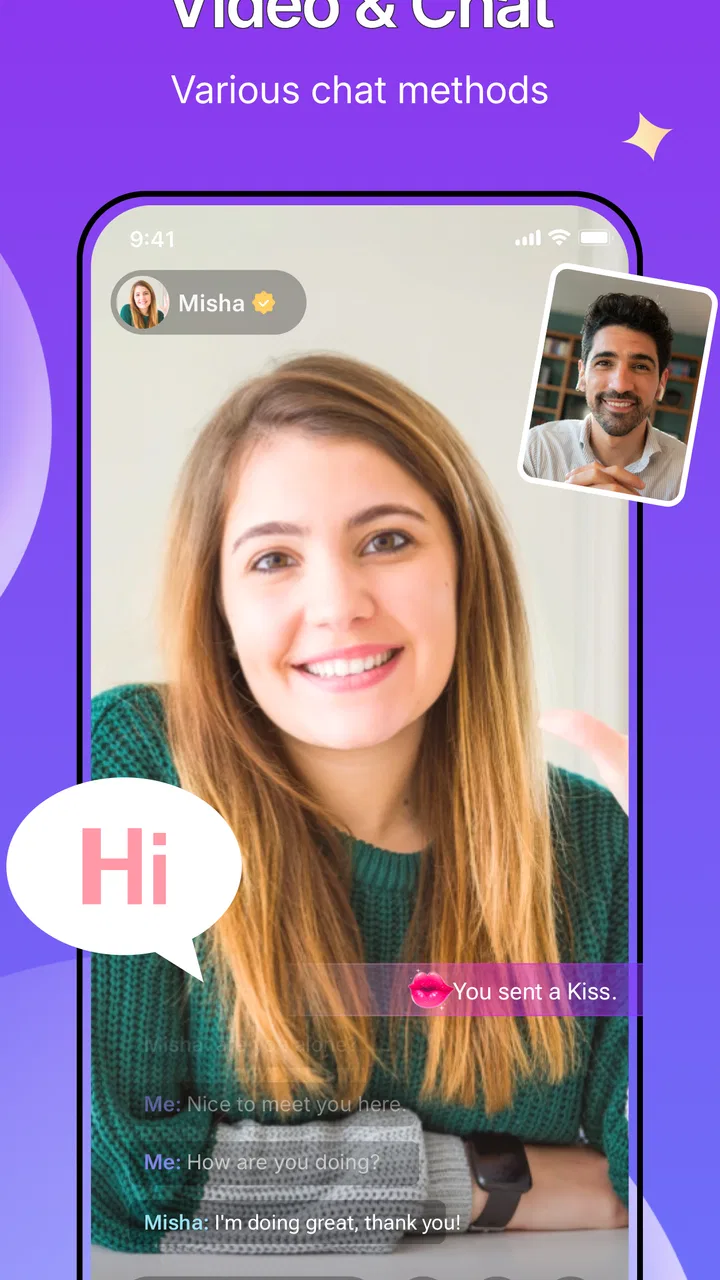
I tried Vava.chat-Video Call&Translate with one question in mind: can a private video conversation remain natural when two people do not share a language? That focus makes this social app more interesting than a standard video-calling tool. Its main idea is a one-to-one video call supported by real-time translation, so the conversation is not limited to people who already speak the same language.
My first impression is that the app is built for direct, personal contact rather than group meetings, public posting, or a large community feed. That narrow purpose is also its strongest identity. If you want to meet someone local or connect with people worldwide without relying entirely on a shared language, the translation layer is the reason to consider it. If you mainly need dependable calls with friends, family, or coworkers who already understand you, a familiar messenger may still be simpler.
Real-time translation is the feature that changes the call
The important capability here is not video by itself. Plenty of social apps can put two faces on a screen. The useful difference is the attempt to keep a private one-to-one conversation moving while language is being translated in real time. In my experience, that changes the rhythm of a call: instead of ending the conversation when a phrase becomes difficult, I can pause, let the translation help, and continue.
You May Also Like

 Blood Strike: 2.5 Anniversary
Blood Strike’s Loadouts Turn Every Drop Into a Tactical Gamble
A close look at Blood Strike’s custom loadouts: how fast access to signature weapons reshapes its battle royale rhythm, rewards preparation, and narrows the gap between fights.

 Pandora - Music & Podcasts
Pandora’s Music Is Easy to Start, but Harder to Recover
Pandora’s strength is its low-effort path from a seed to a station. Its weak spot is how much confidence it asks you to place in connection, setup, and quiet recovery.

 8 Ball Pool
 Is Built on Rivalries, Rematches, and Routine
A close look at the rivalries, rematches, shared routines, and unanswered safety questions that turn a quick pool match into a persistent mobile community.

 Samsung Music
’s Quiet Strength Is Playing What You Already Own
Its reach comes less from spectacle than from dependable access to a personal library. That simplicity is both the app’s strongest retention engine and its ceiling.

 AccuWeather: Weather Radar
AccuWeather Review: A Quick, Clear Forecast for Everyday Decisions
For everyday plans, the best forecast is the one you can understand quickly. AccuWeather makes rain timing, radar, and local conditions easy to act on, with a few trade-offs.

 Hill Climb Racing
Why Hill Climb Racing Still Turns Crashes Into One More Run
A tiny car, a bumpy hill and one more upgrade: Hill Climb Racing keeps resurfacing because its simple chaos makes every near-miss feel personal.
More From Our News Desk



That sounds small, but it affects who can realistically use the app. A normal video call assumes that both people can understand the same spoken language, or that one person is willing to type translations in another application. Vava.chat places the translation purpose inside the call experience, which removes some of the constant switching between a camera app, a translation tool, and a chat window.
The private one-to-one format matters as much as the translation. In a group call, translated speech could become confusing because several voices, interruptions, and different language pairs are competing for attention. A direct call is easier to follow. There are only two participants, one conversation, and a clearer reason to slow down when something needs clarification.
I would describe the experience as a bridge, not a perfect interpreter. Translation can help with the general meaning of a sentence, but it does not remove every problem caused by accents, slang, background noise, jokes, or vague wording. The best results come when both people speak clearly, use shorter sentences, and avoid packing several ideas into one breath. That is a practical habit worth adopting before the first call.
The app comes from GoParty Team and sits in the social category. It is free to install, which makes it easy to test without committing money at the beginning. There are in-app purchases ranging from $0.99 to $203.99 per item, so I would treat the free entry point as an opportunity to understand the experience rather than assuming every part of continued use will cost nothing.
What a translated conversation feels like
A useful way to think about the app is as a conversation with an extra moment of interpretation. You are not simply looking at a person and responding at your usual speed. You need to leave room for the translation process and watch for signs that the other person understood the intended meaning. That makes patience a feature of the user experience, even though it is not a button or setting.
I found that simple questions work better than complicated explanations. Asking about a place, a hobby, a daily routine, or a shared interest gives the translation enough context to be useful. Long stories filled with local expressions are more difficult. When a sentence matters, repeating it in plainer words is often more effective than repeating the exact same phrase louder or faster.
This also creates a different kind of social interaction. A language barrier can make people more deliberate. Rather than filling every silence, both callers have a reason to listen carefully and confirm what they understood. For someone who enjoys meeting people from different backgrounds, that extra patience may feel worthwhile. For someone who expects instant, effortless conversation, it may feel like friction.
The translation feature works best when it supports a conversation, not when it is expected to rescue a confusing one. That distinction is important. I would not use the app for sensitive instructions, legal discussions, medical decisions, or any situation where one misunderstood word could create serious consequences. For casual social contact, it can be useful. For high-stakes communication, a qualified human interpreter remains the safer choice.
How I would use it in practice
Before starting a call, I would decide what kind of conversation I want rather than opening the app without a plan. A short introduction, a few easy questions, and one shared topic create a much smoother first exchange than trying to discuss everything at once. It also makes it easier to notice whether the translation is helping both people or whether the language gap is still too large.
During the call, I would keep sentences compact and give the other person time to respond. If a translation seems odd, I would rephrase the idea with familiar words instead of arguing with the result. For example, a question about someone’s work can be made clearer by asking what they do during a normal day. This approach is more useful than relying on idioms, sarcasm, or regional expressions that may not carry across languages.
One non-obvious advantage is that the video itself supplies context that text translation cannot. Facial expressions, gestures, and the surrounding tone can help both people understand whether a message is friendly, uncertain, or playful. That does not make translation flawless, but it can make a short translated phrase feel less isolated than the same phrase in a text box.
There is also a practical trade-off in that visual context. A video call asks you to be comfortable being seen, and not everyone wants that with a new contact. I would use the app only when I am ready for a direct interaction and would avoid treating a translated call as a substitute for thoughtful boundaries. The one-to-one format feels more personal than browsing public posts, so the decision to answer a call deserves a little care.
Another useful habit is to agree on a fallback. If a phrase is not clear, both callers can type a short version, repeat the idea, or move to a simpler question. The translation capability remains the center of the experience, but a backup method prevents one difficult sentence from stopping the entire conversation. This is especially helpful when the topic changes quickly or when either person is speaking emotionally.
A realistic everyday scenario
Imagine that I am visiting a city where I do not speak the local language well. I want to talk with someone who can suggest a neighborhood, explain a custom, or share what daily life feels like there. A conventional video messenger is not much help unless we already share a language. I could copy every message into a separate translator, but that would turn a personal exchange into a slow sequence of app switching and pasted sentences.
With Vava.chat, the appeal is being able to have a private visual conversation and use real-time translation as support. I could ask a simple question, listen to the translated response, and follow up immediately. If the conversation becomes unclear, I could slow down, rephrase the question, and use the visual cues from the other person to judge whether we are connecting.
This scenario shows where the app has a meaningful advantage over an ordinary social messenger: the language difference is not an occasional inconvenience; it is the reason the conversation might not happen at all. The app does not need to replace every communication tool. It only needs to make this particular kind of connection possible enough to be enjoyable.
A second scenario is a person who has friends or acquaintances abroad and wants more than typed messages. Text is often convenient, but it can flatten personality and make every exchange feel like homework when translation is involved. A translated video call can bring back expressions, timing, and a sense of presence. I would still keep the subject matter relaxed, but the format could make an international friendship feel more immediate.
The same scenario also reveals when I would not recommend it. If the goal is a formal remote interview, a work presentation, or a call involving several participants, I would choose a tool designed specifically for those tasks. Vava.chat’s value is concentrated in personal, one-to-one social contact. Asking it to behave like a business conferencing platform would miss the point.
Where it differs from ordinary social apps
Most social apps begin with a feed, a profile, messaging, or a broad network of contacts. Vava.chat is more focused on the moment when two people actually speak face to face. That can feel refreshing if feeds and public interactions are not what you want. It can also feel limited if you expect a rich content ecosystem, extensive group communication, or a familiar messaging history.
Compared with a standard video-calling app, the translation capability is the clear reason to switch. A conventional call is usually better when both participants already understand one another because it has less to explain and less translation-related pacing to manage. Vava.chat becomes more compelling as the language gap grows, provided both callers are willing to communicate patiently.
Compared with a standalone translation app, the social advantage is the direct human connection. Translation tools are often excellent for a phrase, sign, or written exchange, but they do not automatically create a private video conversation. Vava.chat combines the social purpose and translation purpose in one place. The trade-off is that you are choosing a specialized social experience rather than a neutral utility that can be used for any kind of translation.
I also see a difference from public live-streaming platforms. A private one-to-one call is less performative than speaking to an audience, and there is no need to entertain a crowd. That makes it better suited to genuine conversation, language practice, or getting to know one person. On the other hand, people who enjoy public interaction, group energy, or discoverability may find the narrower format less engaging.
Limitations worth considering before installing
The first limitation is the unavoidable uncertainty of machine-assisted translation. Even when the broad meaning is correct, the emotional tone or small detail may be wrong. Humor is especially fragile. A joke that depends on wordplay may become confusing, while a polite phrase may sound more direct than intended. I would keep early conversations light and confirm important points instead of assuming every translated sentence is exact.
The second limitation is conversational speed. Real-time support does not necessarily mean that the exchange feels as fast as a call between two fluent speakers. Pauses can become part of the experience, and a lively back-and-forth may lose some energy. This is not a flaw unique to this app; it is the cost of trying to connect across languages. Still, people should know that the feature improves access rather than making language differences disappear.
Privacy and comfort also deserve attention because the app is designed around private video calls. I would think carefully about whom I contact, what I show on camera, and what personal details I share during an early conversation. The mature age rating of 17+ is a clear signal that this is not an app for children. Parents looking for a general-purpose family calling tool should choose something with an audience and safeguards designed for younger users.
The purchase range is another reason to pay attention while using the app. Since the app is free to start but includes optional purchases, I would check what an action costs before confirming it and avoid treating a large purchase as a routine part of socializing. The upper end of the listed range is substantial, so this is one of those apps where a quick look at the purchase screen is sensible rather than careless tapping.
Compatibility is fairly broad for older devices because the minimum operating system is Android 7.0. That helps people who do not own a recent phone, although the quality of any video call still depends on the device, camera, microphone, connection, and surrounding noise. I would test the experience in a quiet place before judging the translation itself. Poor audio can look like a language problem when the real issue is that the words were not captured clearly.
Who will get the most from it
I think the strongest audience is socially curious people who want private conversations with contacts from other countries or language communities. It may also suit travelers, international students, long-distance friends, and anyone practicing a language who values seeing and hearing a real person rather than completing isolated exercises. The translation feature gives these users a practical reason to keep trying when a normal call would be too difficult.
The app can also help someone who is shy about making mistakes in another language, but only if that person accepts that the conversation will still require participation. Translation is a support, not a way to remain completely passive. You still need to ask questions, clarify misunderstandings, and show interest. In return, the private format may feel less intimidating than speaking before a public audience.
I would skip it if my main need is a stable family calling routine with people who already use the same language. In that case, a familiar messenger may offer a more direct experience with less setup and fewer translation-related pauses. I would also skip it for professional meetings, large groups, sensitive subjects, or situations requiring precise interpretation. The app is most convincing when the social reward of meeting someone outweighs the inconvenience of communicating across a language barrier.
Its popularity suggests that the concept has broad appeal: Vava.chat has a 4.7 average from around 80 thousand ratings and has passed 10 million installs. Those figures do not tell me whether every call will be satisfying, but they do show that the idea has reached a substantial audience. The current version is 4.7.5, and the app was released on April 1, 2021, so it is not a brand-new experiment.
My recommendation after using the app
I would recommend Vava.chat-Video Call&Translate to someone who specifically wants private one-to-one video conversations where language differences would otherwise get in the way. Its real strength is not that it makes every conversation effortless. It gives two people a workable path to begin, continue, and repair a conversation that a normal video app might not support at all.
My advice is to approach it with realistic expectations: speak clearly, keep early topics simple, allow pauses, and rephrase anything important. Use the translation as a bridge while paying attention to the person on the other side of the screen. That combination produces a better experience than expecting an automated feature to handle every accent, joke, or emotional nuance perfectly.
For international social contact, the app offers a distinctive reason to exist. For ordinary calling, it may be more specialized than necessary. I like that its purpose is clear, and I think the right user will notice the difference quickly. If your goal is to make a genuine private connection across a language barrier, Vava.chat is worth trying; if your goal is simply to make routine calls, choose the simpler tool that already fits your conversations.
FAQs for Vava.chat-Video Call&Translate
01What is Vava.chat – Video Call & Translate used for?
Vava.chat – Video Call & Translate is designed for making video calls with people who speak different languages. Its main appeal is the combination of live video communication and translation tools, which can help users understand conversations more easily. It may be useful for meeting international friends, communicating with relatives abroad, practicing languages, or chatting with new people across language barriers.
02Does Vava.chat provide real-time translation during video calls?
The app is built around translation-assisted communication, but the exact experience can depend on the supported languages, account settings, device permissions, and the current version of the application. Translation may not always be perfectly literal, especially with slang, accents, background noise, or fast speech. Users should treat the feature as a helpful aid rather than a replacement for a professional interpreter.
03Is Vava.chat free to download and use?
Vava.chat may be available to download at no initial cost, but some features can require in-app purchases, subscriptions, credits, or other paid options. Video calling and translation services may also consume mobile data, particularly when used over cellular networks. Before starting calls or accepting a trial, check the app store listing and its payment terms so you understand which functions are free and which may generate charges.
04What permissions and account information does the app require?
For its main functions, Vava.chat will typically need access to the camera and microphone, and it may request notifications, contacts, storage, or network access depending on the features you use. You may also need to create an account or provide basic profile information. Review the privacy policy and permission prompts carefully, and only enable access that is necessary for the calling and translation features you intend to use.
05Is Vava.chat safe for meeting and video chatting with strangers?
As with any social video-chat application, users should remain cautious when interacting with people they do not know. Avoid sharing passwords, financial details, precise location information, or private documents, and be careful with links or requests for money. Use available blocking and reporting tools if someone behaves improperly. Parents should also review the app’s age rating and supervision options before allowing younger users to access it.
Pros
- Real-time translation helps bridge language barriers during video calls.
- Simple interface makes starting a call quick for new users.
- Useful for meeting international friends
- clients
- or language partners.
- Video calling adds more personal interaction than text-based translation.
- Cross-language communication can be convenient while traveling abroad.
Cons
- Translation accuracy may vary with accents
- slang
- noise
- or fast speech.
- Call quality depends heavily on both users’ internet connections.
- Some features may require a subscription or in-app purchases.
- Using video and translation can consume significant battery and data.
- Privacy details should be checked carefully before sharing sensitive conversations.

Vava.chat-Video Call&Translate
Gallery